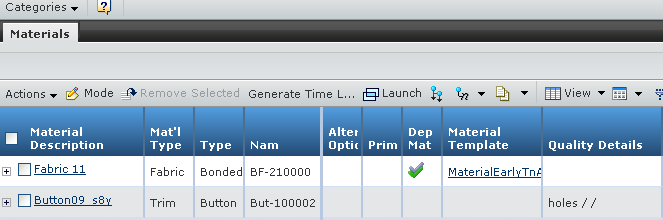
The Materials tab contains the following details:
Marketing Name - Indicates the marketing name of the sub product when
the current Early Time and Action is created from the Set or Pack Product.
Material Description - Indicates the description of the material.
Mat'l Type - Indicates the type of the material.
Type - Indicates the type of the fabric or the type of the trim.
Name - Indicates the name of the fabric or trim.
Alternative Option - Indicates that whether the current material is
the alternative source or not.
Primary - Indicates whether the material is primary material of the
product.
Dep Mat - Indicates whether the material is dependency material.
Material Template - Indicates the template of the material.
Quality Details - Indicates the quality details of the material.
Bulk Lead Time - Indicates the bulk lead time of the material.
Dying Lead Time - Indicates the production dying lead time of the material.
Supplier - Indicates the supplier of the material.
Ship Mode - Indicates the ship mode of the material.
Country of Origin - Indicates the country of origin of the material.
Lading Port - Indicates the lading port of the material.
Ship To Country - Indicates to which country the material will be shipped.
Material Receiving Port - Indicates the receiving port of the material.
Mat'l Transit - Indicates the transit time of the material.
Article # - Indicates the article number of the material.
Note:
If the T&A is created from the Set or Pack Product, then Materials
tab will show the materials of the Set or Pack Product and the materials
of its sub product.
Note:
If the T&A is created for the BOM Variant, then Materials
tab will show the materials of the Variant.
 > Early Time and Action.
The Early Time and Action page opens listing the available Early Time
and Action records in the status specified on the page toolbar.
> Early Time and Action.
The Early Time and Action page opens listing the available Early Time
and Action records in the status specified on the page toolbar.
 at the end of the row,
the Time and Action page opens and consist of two tabs, namely Properties
and Materials.
at the end of the row,
the Time and Action page opens and consist of two tabs, namely Properties
and Materials.