Editing Sourcing Attributes | ||
| ||
From the global toolbar, click
 > Vendors. The Vendors page
opens.
> Vendors. The Vendors page
opens.
Select Supplier Process from the drop-down list at the top right corner of this page. All the suppliers are listed in this page.
Click Company Name of a supplier or click
 at the end of the row.
The supplier Properties page opens.
at the end of the row.
The supplier Properties page opens.
From the page toolbar, click Categories > Sourcing Attributes. The Sourcing Attributes PowerView page opens.
Click Edit from the Sourcing Attributes tab toolbar. The editable Properties page opens.
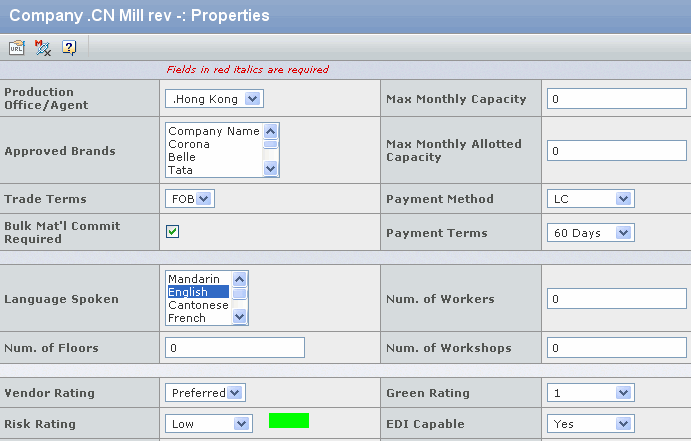
Edit the following parameters in this page:
Production Office/Agent - Select a production office or agent from the dropdown list to indicate the sourcing office that is primarily responsible for activities with the supplier.
Approved Brands - Select one or more brands from the list to indicate that this supplier may provide materials and/or services for those brands.
Max Monthly Capacity - Enter a quantity to indicate the total maximum monthly unit production capacity of the supplier.
Max Monthly Allotted Capacity - Enter a quantity to indicate the maximum total units the supplier can be allotted in a month.
Trade Terms - Select trade terms from the dropdown list, such as FOB , CIF , LDP or DOP .
Payment Method - Select payment method from the dropdown list, such as Cash, LC or Bank Draft.
Payment Terms - Select payment terms from the drop-down list, such as 1 - 60 days.
Bulk Material Commit Required - Check box to indicate whether a bulk material commitment is required.
Note: This parameter is only available if the material supplier is a mill.
Language Spoken - Select one or more languages from the language list.
Num. of Workers - Enter the number of workers employed by the supplier.
Num. of Floors - Enter a quantity to indicate how many floors the supplier's workshop has.
Num. of Workshops - Enter a quantity to indicate how many workshops the selected supplier has.
Vendor Rating - Select the vendor rating from the drop-down list, such as Preferred, Standard or New.
Green Rating - Select the green rating from the drop-down list, such as 1, 2 or 3.
Risk Rating - Select the risk rating from the dropdown list, such as Low, High or Medium.
EDI Capable - Select Yes or No from the drop-down list to indicate whether the selected supplier has the Electronic Data Interchange capability.
Full Package Capable - Select Yes or No from the drop-down list to indicate whether the selected supplier has the full package capability.
Comments - Enter any comments regarding the supplier.
Note: If the Supplier has FG Factory Capability, the following parameters can also be edited.
Num. of Sewing Lines - Enter a quantity to indicate how many Sewing Lines the supplier has.
Num. of Linkers - Enter a quantity to indicate how many Linkers the supplier has.
Num. of Knitters - Enter a quantity to indicate how many Knitters the supplier has.
Click Done.