Approving a POA | |||
| |||
In the tab toolbar, click Edit Details.
The Edit Details page appears.
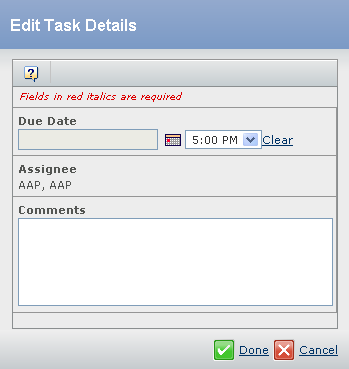
Enter the following details about the Task.
Fields in red and italics are mandatory attributes.
- Click
 to select an appropriate Due Date and select an appropriate Due Time from the list.
- Click
If the FDA compliance is enabled in the system then the system will ask for user credentials before performing the following steps.
- If Approve is clicked then,
- The Inbox task will be Approved and completed.
- POA is promoted to the Approved state.
- If Reject is clicked then,
- The Inbox task will be Rejected.
- A notification email for the rejection of the POA will be sent to the creator of SKU POA through IconMail and Outlook (if it is configured with the application).
- The associated route is stopped.
Note: You can restart the route from the task rejection notification sent to the creator of the SKU POA and regenerate the approval task for the Artwork Approver.