Perform one of these procedures:
- View the Properties page for the needed Defect Action. See Viewing Defect Action Details.
- From the page Actions menu or toolbar, click Assign.
Or: From a list of Defect Actions, click  for the needed Defect Action. for the needed Defect Action.
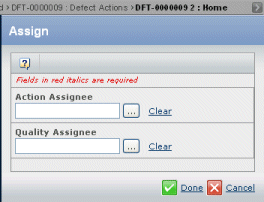
Select an action assignee:
- Click the ellipsis button for Action Assignee.
The Search page opens listing all uses who have the Development Engineer role.
- If needed, enter search criteria and click Search to narrow down the list of people.
- Select the needed person.
- Click Submit.
Select a quality assignee:
- Click the ellipsis button for Quality Assignee.
The Search page opens listing all uses who have the Quality Engineer role.
- If needed, enter search criteria and click Search to narrow down the list of people.
- Select the needed person.
- Click Submit.
Click Done.
The selected people are assigned as responsible for executing and testing the Defect Action fix.
|