Viewing PLM Status | ||
| ||
Click ENOVIA > PLM Status from Inventor toolbar to open the PLM Status dialog box.
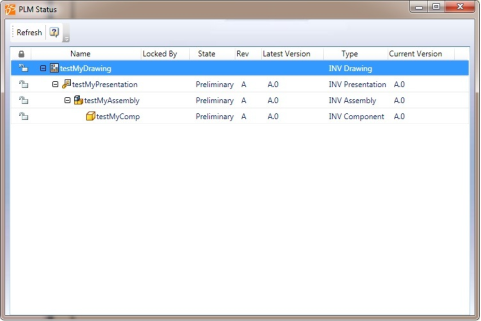
Note: If the root node is not saved to ENOVIA, then only the Name and Type columns display information for the design in the PLM Status dialog box. No information is displayed in the Locked By, State, Rev, Latest Version, and Current Version columns for this design.
The following columns in PLM Status dialog box display information of the designs:
Note: If there are multiple designs open in Inventor, the PLM status is displayed only for the design and its child components that is active.
Name. Name of the design.
Type. Type of the design.
Current version. Displays the version of the design that is currently active in Inventor. Current version is displayed as UNKNOWN if the design is not in ENOVIA.
Locked By. Displays the user name of the person who has locked the design. This is blank for a new design.
State. Current maturity level of the design in ENOVIA lifecycle. This is blank for a new design.
Rev. Current revision of the sequence. This is blank for a new design.
Latest Version. Displays the last known or the latest version of the design.
Note: You can minimize the PLM Status dialog box and continue working with Inventor, make changes in the structure, or lock/unlock designs in the design structure.