Overview | ||
| ||

About Supplier Central
Supplier Central is a business collaboration solution that facilitates information sharing and quality control between Buyers and Suppliers in a secure Internet environment.
People at the buyer company, depending on their roles, can view or manage details about Suppliers, parts, part quality plans, plant or supplier scorecards, buyer desks, and purchase classes. Buyer employees use the quality management functions to control and manage the quality of the parts that suppliers provide to them. Buyer employees can use buyer desks to collect part and supplier information in a personal or shared area.
People at the supplier company, depending on their roles, can view and update employee and company information for their company only. Supplier employees can monitor and support their company's quality development plans.
Supplier Central Roles
This ENOVIA Supplier Central User's Guide is intended to help employees of both the buyer and supplier companies use Supplier Central. This table lists the available roles for each type of company.
| Role | Description | Buyer or Supplier Company |
|---|---|---|
Creates, manages, and views Part Quality Plans, Supplier Development Plans, deliverables and documents, plant scorecards, supplier scorecards, and purchase class scorecards. |
Buyer |
|
Tracks assigned parts and suppliers using a Buyer Desk. Assigns supplier responsibilities, provides suppliers with technical information and is the focal point for supplier conversations with a company. The Buyer role also includes Design and Manufacturing Engineers, who create plans, drawings, models, and other part specifications and approve parts for release. Engineers can, with Buyer approval, initiate contact with suppliers regarding a newly-available process or product. |
Buyer |
|
Captures information about and sets up initial supplier profiles, including certifications and directed supplier assignments. Creates Buyer Desks and assign buyers, purchase classes, and suppliers to them. Creates and maintains purchase classes. |
Buyer |
|
Views details about suppliers and the standards manual. Creates and manages plant scorecards. |
Buyer |
|
Creates and manages part quality plan templates. Can view details about parts, suppliers, PQPs, and WBS tasks that are related to PQP templates. |
Buyer |
|
Creates, manages, and reviews Part Quality Plans, Supplier Development Plans, deliverables and documents, plant scorecards, supplier scorecards, and purchase class scorecards. |
Buyer |
|
Submits information to support qualification for part manufacture, design, or testing. Can view assigned parts and related documents, Standards Manual, Part Quality Plans and deliverables, and their company's profile information. |
Supplier |
|
Submits information to support qualification for part manufacture, design, or testing. Can view assigned parts and related documents, the Standards Manual, Part Quality Plans and deliverables (including checking in files), and their company's profile information. |
Supplier |
|
Can access PQPs for the supplier company. |
Supplier |
|
Responsible for maintaining their company's parts, organizational, and personal information. They can search for assemblies and components that Buyer company has given them responsibility. Supplier Representatives can get a summary list of the parts they are responsible for, see details about each part, and view details about their responsibilities. Supplier Representatives can also access subcomponents to which they have been given visibility and access CAD models, CAD drawings, drawing prints, and reference document that are associated with the assigned parts. |
Supplier |
ENOVIA Live Collaboration Licenses
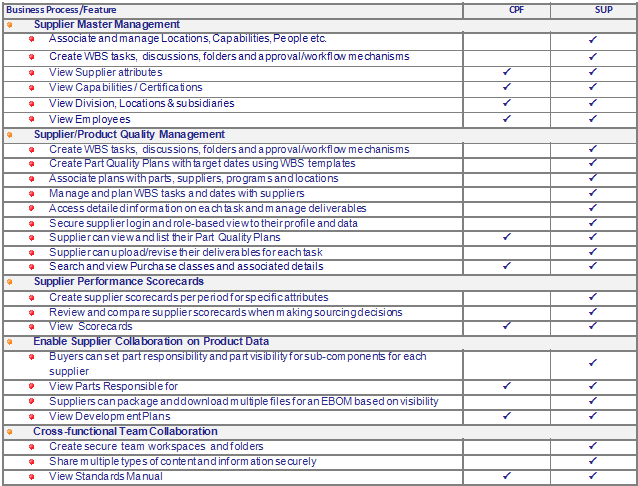
ENOVIA Live Collaboration users can access certain details about Supplier Central objects. A checkmark in the CPF column indicates you can access that feature using an ENOVIA Live Collaborationlicense. If you need access to additional Supplier Central features (the SUP column), you may need a Supplier Representative or Supplier Central role and license. Contact your ENOVIA Business Administrator for details.
Before Reading This Guide
You should read the Application Exchange Framework User's Guide for details on using the user interface, including tools such as filters, printer-friendly pages, collections, and more.
You should also read the Common Components User's Guide for help using the common features that Supplier Central takes advantage of, such as subscriptions and discussions.
Several types of objects, such as WBS Tasks, Suppliers, and Parts, include categories provided by ENOVIA Business Process Services. The details for those pages is provided in the user's guides and online help for those products.
 on the page. A separate help window opens
that displays the help topic for the page along with a navigable table
of contents for the user guide.
on the page. A separate help window opens
that displays the help topic for the page along with a navigable table
of contents for the user guide.