To add a new member, click Add Project
Member(s) from the page Actions menu or toolbar.
Or
To edit access for an existing member, click Edit
Access from the page Actions menu or toolbar.
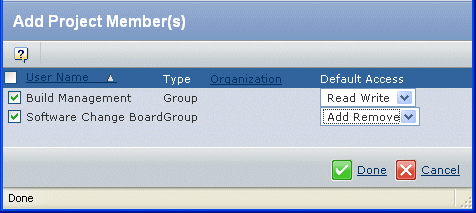
The page title varies depending on whether you're adding
new members or editing existing members. For adding new members, this
page lists all project members not already in the access list. For editing
existing members, this page lists only those members in the access list
and their current access levels.
For each member that you checked, choose an access
level:
Read. A person with Read
access can view folder properties, participate in discussions for it,
and view accesses for the folder.
Read Write. A person with Read
Write access to a folder can perform the tasks described for Read access.
Additionally, people with Read Write access can edit basic information
for the folder.
Add. A person with Add access
to a folder can perform all Read and Write actions and can also add content
to the folder and add subfolders.
Remove. A person with Remove
access to a folder can perform all Read and Write actions and can also
remove items from the folder and remove subfolders.
Add Remove. A person with Add
Remove access to a folder can perform all Add and Remove actions and
can also add and remove members from the access list and change access
levels.