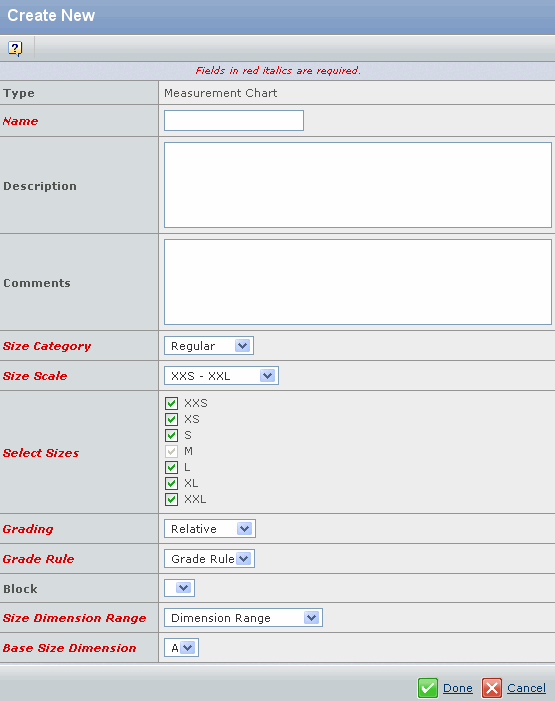
| Name |
The measurement chart you want to create. |
| Description |
Specify a description of the measurement
chart you are creating. |
| Comments |
Specify a comment of the measurement
chart you are creating. |
| Size Category |
Select a size category from the drop-down list to create
measurement chart. |
| Size Scale |
Select a size scale from the drop-down
list to specify the range of sizes you can create for the measurement chart. |
| Select Sizes |
Select the sizes check boxes to create measurement for
selected size range. The measurement chart will have base size as a default size. |
| Grading |
Select a grading from the drop-down
list to specify Incremental or Relative grade calculation. |
| Grade Rule |
Specify a grade rule from the drop-down
list to select a grade rule for the product. The grade rule values are
displayed based on the size scale you specified. |
| Block |
Specify a block from the drop-down list
to select a block for the product. The block values are displayed based
on the Grade Rule you specified. |
| Size Dimension Range |
Select the size dimension range from the drop-down
list. The size dimension range is specific to the selected product type
for which measurement chart is created. See Creating a Size Dimension Range. |
Note:
If Size Dimension Range is selected as None, then regular measurement chart
is created.
|
| Base Size Dimension |
Select the base size dimension from drop-down
list. Base size dimension specifies the base dimension for the measurement
chart. |
Note:
The field Base Size Dimension appears only if Size Dimension Range
is selected.
|