Viewing the Fabric Cost | |||||
|
| ||||
From the global toolbar, click
 > Library > Fabrics. The Fabrics page opens listing all the available fabrics.
Click Name of a fabric or click
 at the end of the row.
The fabric Properties page opens.
at the end of the row.
The fabric Properties page opens.
From the page toolbar, click Categories > Approved Colors.
The PowerView page opens with two tabs Approved Color and Fabric Cost.
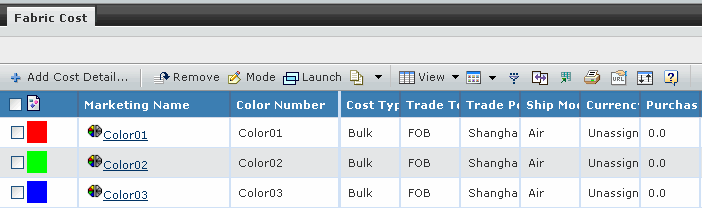
The Fabric Cost tab contains the following details of the fabric cost:
 - Indicates the image
of the color or print.
- Indicates the image
of the color or print.Marketing Name - Indicates the marketing name of the color or print.
Color Number - Indicates the number of the color or print.
Print Type - Indicates the type of the print.
Cost Type - Indicates the cost type of the fabric.
Trade Terms - Indicates the trade terms agreed upon with the supplier.
Trade Point - Indicates the trade point agreed upon with the supplier which enables the calculation of freight costs.
Ship Mode - Indicates how the material will be shipped, such as Air, Sea or Truck.
Currency - Indicates the currency selected for the fabric cost. All the cost values are entered in this currency.
Purchase Cost - Indicates the purchase cost for the fabric.
Purchase Cost UOM - Indicates the unit of measurement applied to Purchase Cost.
Standard Cost - Indicates the standard cost for the fabric. The system calculates it by using the formula of "Purchase Cost * Standard Cost UOM / Purchase Cost UOM".
Standard Cost UOM - Indicates the unit of measurement applied to Standard Cost.
Quote Date - Indicates the date when the quotation is returned to the requestor.
Effective From - Indicates the start time of the period during which the quotations from the supplier are valid.
Effective To - Indicates when the quotation will expire.
Status - Indicates the status of the approved color or approved print record.
Remarks - Indicates additional information for the fabric cost.